


Clime: NOAA Weather Radar Live
4.246.05K Reviews
App Specs
- Version
- 1.72.7
- Updated On
- License
- Free
- Downloads
- 10,000,000+
- Developer
- Mosaic Srl
- Categories
- Weather
- Platform
- Android, iOS
Screenshots
 Analysis by AppCompare
When I’m deciding whether a weather app deserves a place on my phone, I want more than a quick temperature check. I want to know whether its map helps me make a better call before leaving home, and whether the useful parts are available without paying. That balance is what I kept in mind while trying Clime: NOAA Weather Radar Live, a weather app from Mosaic Srl.
What you can expect before spending anything
Clime is free to download, so you can try it without an upfront purchase. It also offers in-app purchases, with listed prices ranging from $0.99 to $81.99 per item. That is a wide spread, so I would treat the free version as the sensible starting point rather than assuming that every useful tool requires a subscription or upgrade. Check the purchase screen in the app before committing, and consider whether a paid option solves a specific need you actually have.
The app has a 4.2 average from around 421,000 ratings, and it has been installed over 10 million times. Those figures suggest that it has found a substantial audience, but they do not tell me whether it suits every routine. My own test is more practical: can I understand the weather quickly, and does the radar view help me plan? Clime makes its strongest case when I want to inspect changing conditions on a map rather than rely on a single forecast summary.
First Impressions and Usability
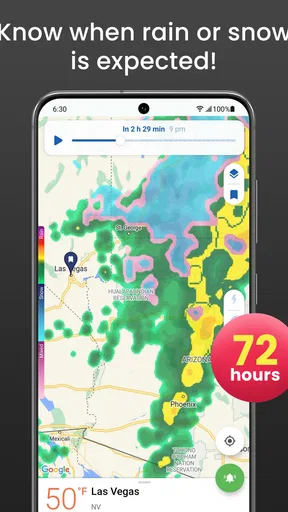
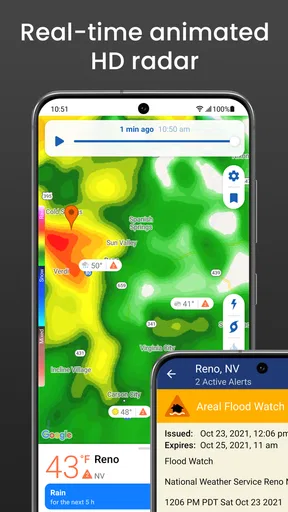
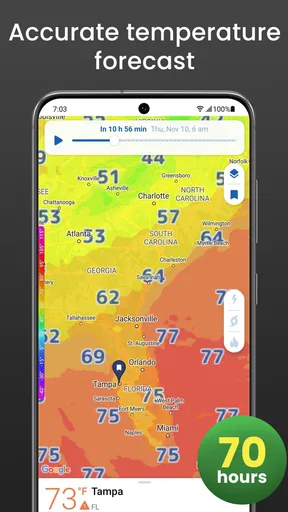
When I first fired up the Clime: NOAA Weather Radar Live app, the interface instantly caught my eye. It’s sleek, intuitive, and doesn’t bombard you with unnecessary information right off the bat. The home screen greets you with a real-time radar map, showcasing weather patterns in vibrant colors. Seriously, it’s like watching a live painting evolve with every tap and swipe.
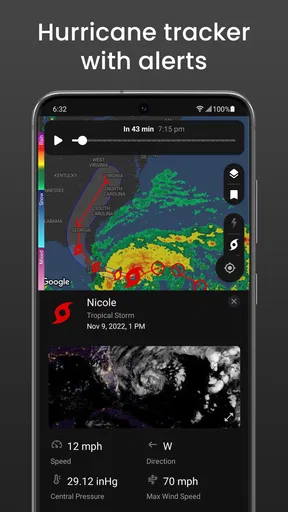
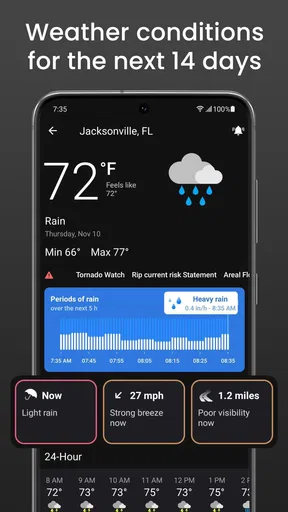
Navigating through the app is a breeze—no pun intended. The menu is straightforward, offering options like weather alerts, forecasts, and a handy hurricane tracker. Whether you’re a weather enthusiast or just someone trying to decide if you need an umbrella, Clime has got you covered.
Reading the radar with a purpose
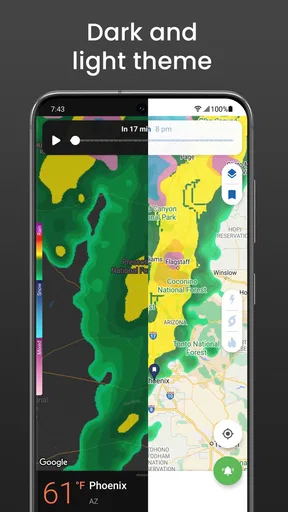
A radar map is most useful when I treat it as a planning aid, not a promise about the exact weather at my front door. I zoom in on the place I care about, look at how precipitation is moving, then compare that picture with the forecast before deciding whether to leave early or wait. This is a more useful routine than glancing at a broad regional map and assuming the same conditions apply everywhere nearby.
For a commute, I would check the map before setting off and again if the sky changes. For a walk or an outdoor appointment, I would use the forecast to decide whether the plan is reasonable, then use the radar to see whether rain appears to be approaching. That combination can help with timing, but I would still leave room for conditions to change. Weather maps are valuable context, not a guarantee that a short shower will miss a particular street.
Worth Reading Before You Choose

Flipboard Shows What News Apps Must Do Beyond the Feed

Switching to Android Auto Means Rethinking Your Driving Routine

Google Calendar Makes a Crowded Week Easier to Manage

Ludo King Makes the Most of the Minutes Between Plans

Baby Panda World Brings Quick Play to Modern Phones, but Its Game Library Feels Busy

ESPN’s Live Game View Makes Following Close Games Easier
In-Depth Features
One feature I found particularly cool is the app’s ability to provide hyper-local forecasts. It doesn’t just give you a general overview; it zooms right into your area, offering detailed predictions. This is perfect for planning outdoor activities or just knowing when to hunker down at home.
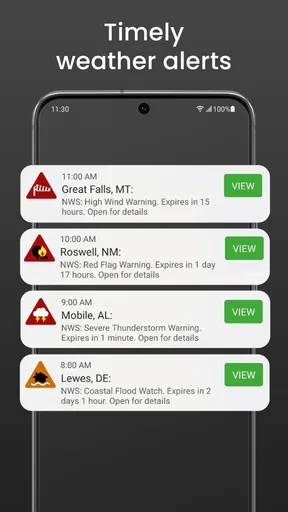
Another standout is the weather alerts. You can customize notifications to keep you informed about severe weather conditions. Whether it’s thunderstorms, hurricanes, or even a surprise snow day, Clime ensures you’re never caught off guard. The alerts are timely and precise, often arriving before any official announcements.
Alerts are most useful when you make them selective
For me, notifications work best when they are reserved for weather that could change a decision. If every alert competes for attention, it becomes easier to dismiss the one that matters. I would start with the kinds of severe conditions relevant to where I live, then adjust the choices if I find the notifications too broad or too frequent. That small bit of setup is worth doing before a busy week, rather than waiting until a warning arrives while I am already on the move.
One practical scenario is a day when I have an outdoor commitment but also need to travel across town. I can check the forecast while planning, then use the radar and alerts as a reason to reconsider the departure time if conditions look unsettled. For a serious warning, I would follow official local guidance rather than treating an app notification as a substitute for emergency instructions. Clime can help me notice changing weather; it should not be the only source I rely on when safety is at stake.
Visual Appeal and Customization
Now, let’s talk visuals. The radar maps are not just functional; they’re also quite stunning. With adjustable layers, you can toggle between precipitation, temperature, and wind speed visuals. This level of customization is a dream for anyone who loves a good data dive.
Moreover, the app allows you to switch between dark and light modes, which is perfect for night owls like me. No more blinding lights when you’re checking the weather at midnight!
Choosing a layer without overreading it
The different map layers are useful when they answer a particular question. If I am checking whether rain may disrupt a walk, precipitation is the obvious place to start. If I am thinking about comfort outdoors, temperature and wind give a different kind of context. Switching layers deliberately is clearer than piling every visual cue into one glance and trying to interpret it all at once.
That flexibility is also a trade-off: a map can look precise without making a forecast certain. I would use the layers to understand the broader situation, then keep the ordinary forecast in view for the actual decision. If all I need is today’s high and low, opening a detailed radar display may be more work than checking a simpler weather screen. Clime is a better fit when I want to explore conditions, not when I want the fewest possible taps.
How it fits beside other weather apps
Compared with the standard weather app that comes with a phone, Clime puts more emphasis on radar and visual inspection. That can be a real advantage when clouds or rain are moving through and I want to see the pattern rather than read only a short forecast. A basic forecast app may still be quicker for a routine temperature check, and someone who prefers a compact list of daily conditions might find that simpler approach easier to live with.
Clime also makes more sense for people who enjoy checking maps than for anyone hoping that one app will remove uncertainty from forecasting. I would keep a local official source in mind for urgent warnings, and use Clime as a convenient way to follow radar, forecasts, and alerts together. The right comparison is not “which app is always correct?” but “which view helps me make this particular decision?”
Performance and Accuracy
Performance-wise, the app runs smoothly, even on older devices. There’s no lag when switching between features, and the radar updates in real-time. I’ve compared Clime’s forecasts with other sources, and it’s impressively accurate. The app pulls data directly from NOAA, ensuring that you’re getting reliable information every time you check.
It’s worth mentioning that the app offers a free version with basic features, and a premium version that unlocks additional functionalities. If you’re someone who loves diving into detailed weather data, the premium version is well worth the investment.
What to consider before paying
I would be more cautious about the paid value than the straightforward free download. The in-app purchase range runs from $0.99 to $81.99 per item, so there is no single price point that describes every option. Before buying, I would check exactly which feature or access period an offer covers and whether it addresses something I regularly use. A one-off need to look at weather maps is a weak reason to spend; a feature that genuinely supports a frequent planning routine may be easier to justify.
If you only check the weather occasionally, start with the free access and see whether the app’s map-first approach feels useful in practice. If your main interest is seeing radar and adjusting map layers, that experience may be the reason to keep it. If you rarely open maps and just want a quick forecast, a paid option is harder to defend because a simpler alternative may already meet your needs.
Who is likely to get the most from it?
I can see Clime working well for someone whose plans depend on what is happening nearby: commuters deciding when to leave, people arranging outdoor errands, or anyone who likes to watch weather systems develop. It is also a sensible choice for a weather-curious user who wants more than a temperature card, since the map layers invite a closer look at precipitation, temperature, and wind.
I would skip it if I wanted a minimal screen, rarely checked forecasts, or found map interfaces distracting. It is also not my choice as a sole authority during dangerous conditions. In those moments, I would use official local instructions and treat an app as supporting information. The best fit is someone who will actually use the radar view, not someone downloading it just because more features sound better.
Final Thoughts
All in all, Clime: NOAA Weather Radar Live is a must-have for anyone who likes to stay a step ahead of the weather. With its user-friendly interface, customizable features, and reliable data, it’s a tool that makes daily planning a whole lot easier.
Whether you’re a weather junkie or just someone looking to dodge the rain, Clime is definitely worth a download. Give it a try, and see how it transforms your daily routine!
For those interested, you can snag the app from both the Google Play Store and the Apple App Store. Trust me, once you start using it, you’ll wonder how you ever managed without it.
A grounded download decision
Clime is free to download, rated for Everyone, and its current version is 1.72.7, with Android 8.0 as the minimum operating system requirement. It was released on May 4, 2016, and its broad reach reflects how long it has been available to weather users. I would still make the choice based on the way I check forecasts now: try the free experience, learn whether the radar and alerts fit your routine, and only consider an in-app purchase after confirming its exact terms.
My verdict is to try it if a live map is genuinely useful to you. Clime brings radar, forecasts, alerts, and map customization into one weather-focused app, which is convenient when conditions may affect the day’s plans. If a quick glance at a basic forecast is all you need, stick with the simpler tool you already prefer. For everyone else, the free starting point makes it easy to judge the fit before deciding whether any paid option is worthwhile.
Pros
- Accurate real-time weather updates
- Interactive radar map with overlays
- Customizable weather alerts
- User-friendly interface design
- Detailed forecast for multiple locations
Cons
- Premium features require subscription
- Occasional ad interruptions
- High data usage for radar maps
- Limited offline functionality
- Some complex features need learning
FAQs for Clime: NOAA Weather Radar Live
What features does Clime: NOAA Weather Radar Live offer?
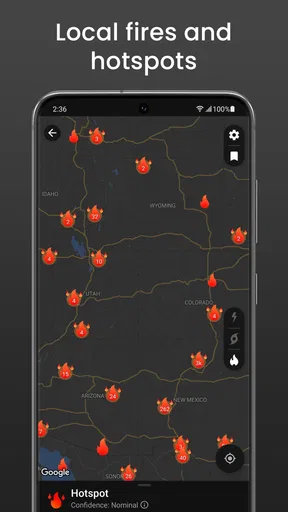
Clime: NOAA Weather Radar Live provides real-time weather radar images, detailed forecasts, severe weather alerts, and customizable notifications. Users can view precipitation maps, track storms, and access hyper-local weather data. The app also includes temperature and wind speed information, offering a comprehensive overview of current and upcoming weather conditions.
Is Clime: NOAA Weather Radar Live free to use?
Clime offers both free and premium versions. The free version provides basic features, while the premium subscription unlocks advanced functionalities such as ad-free experience, extended forecasts, and additional radar layers. Users can choose between monthly or annual subscription plans, ensuring flexibility based on individual needs.
How accurate is the weather data provided by Clime?
Clime sources its data from NOAA, ensuring high accuracy and reliability. The app continuously updates its information to provide users with the latest weather conditions and forecasts. However, as with any weather app, minor discrepancies can occur due to rapidly changing weather patterns and local variations.
Can I customize notifications in Clime: NOAA Weather Radar Live?
Yes, Clime allows users to customize notifications based on their preferences. You can set alerts for specific weather conditions, such as severe weather warnings or precipitation forecasts. This feature ensures you receive timely updates relevant to your location, helping you stay prepared for any weather changes.
Is Clime: NOAA Weather Radar Live available for both Android and iOS?
Clime: NOAA Weather Radar Live is available on both Android and iOS platforms. Users can download the app from Google Play Store or Apple App Store. The app offers a user-friendly interface on both operating systems, ensuring seamless navigation and access to all features regardless of the device used.


